Android
- Access: Mobile browser (Chrome or Firefox recommended)
- Minimum OS: No publicly confirmed minimum version; any modern Android with an up-to-date browser works
- App download: Not available on Google Play; no APK provided
App at Nomini Casino: Play in Your Browser
The full Nomini experience – 9,410+ pokies, live tables, PlayID deposits and your bonus wallet – runs in any modern mobile browser. No download, no storage used.
The full Nomini experience – 9,410+ pokies, live tables, PlayID deposits and your bonus wallet – runs in any modern mobile browser. No download, no storage used.
The full Nomini experience – 9,410+ pokies, live tables, PlayID deposits and your bonus wallet – runs in any modern mobile browser. No download, no storage used.
Open on Mobile Must be 18+ to play. Gambling involves risk and may lead to addiction. Full bonus terms apply.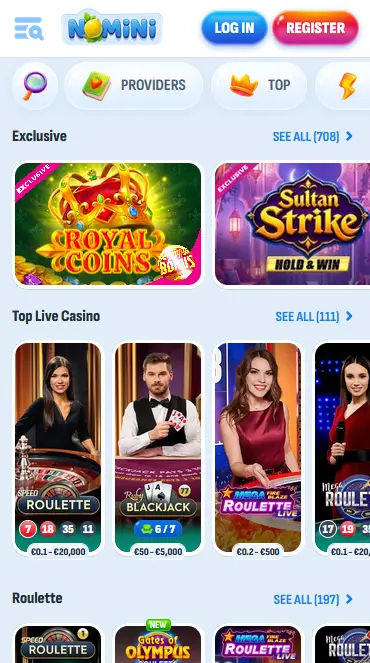
How to Start Playing on Mobile
Mobile Experience Overview
Pros
Cons
Mobile Compatibility
Android
iOS
Why Play Nomini on Mobile
Full Library, No App Required
Every pokie, live table, jackpot game and crash title available on desktop is accessible through the mobile browser. The lobby, cashier and bonus wallet are all touch-optimised.
Instant PlayID Deposits
Fund your account in seconds with PlayID or Neosurf directly from the mobile browser. No extra steps compared to desktop – the cashier is fully functional on any screen size.
Secure Mobile Sessions
SSL/TLS encryption covers every mobile session, protecting login credentials, payment data and personal information across Android and iOS browsers alike.
Stay Secure on Mobile
What You Should Do
What You Should Avoid
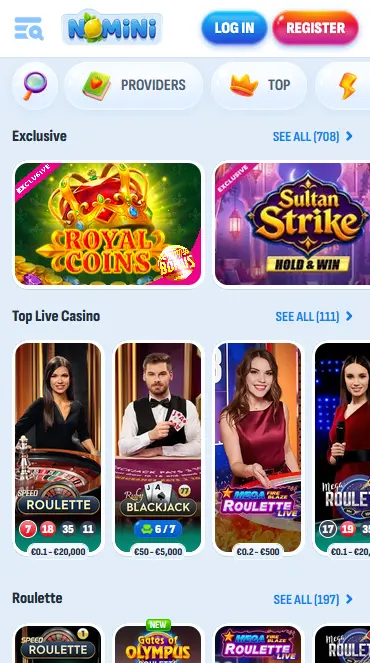
Nomini’s mobile experience delivers the complete casino catalogue through the browser, with no installation barrier between a player and the full lobby. Every feature available on desktop is present on mobile, including the cashier, bonus wallet, live chat and account settings. The absence of a native app is offset by a touch-optimised interface that loads quickly and handles all screen sizes cleanly.
The mobile lobby replicates the desktop navigation structure with category tabs for pokies, live casino, jackpots, crash games and the sportsbook. Provider and game filters, the search bar and the New Games carousel are all functional on touch screens. Tapping any pokie title brings up a Play or Demo button, letting players preview game mechanics without depositing.
Live dealer sessions from Evolution and Ezugi stream in high definition and remain stable over a standard 4G mobile connection, though Wi-Fi is recommended for extended play. The cashier processes PlayID deposits instantly, and e-wallet and cryptocurrency withdrawals are handled through the same mobile-optimised cashier section.
There are none in terms of game access or functionality. Nomini does not maintain a separate mobile catalogue or restrict any feature by device type. The one practical difference is the absence of push notifications, which are a native-app feature. Players who want deposit confirmations or bonus alerts should ensure email notifications are enabled in the account settings.
There is no download or installation involved. Nomini operates entirely through the mobile browser, which means Android users open Chrome or Firefox and navigate to the site, and iPhone or iPad users use Safari. The steps below cover each access route.
Open Chrome or Firefox on your Android device and go to the Nomini site. Tap the login button, enter your credentials and sign in. To access the game lobby, tap any category from the navigation menu at the top of the page. For a home screen shortcut, open the browser’s three-dot menu and select Add to Home Screen. No APK file and no Google Play listing exist for Nomini.
Open Safari on your iPhone or iPad and navigate to the Nomini site. The site scales automatically to the device’s screen size. Sign in with your email and password, then tap any game title to begin. To create a home screen shortcut, tap the Share icon at the bottom of the Safari toolbar and choose Add to Home Screen. The shortcut opens Safari to the Nomini site directly.
Since there is no native app, the home screen shortcut described above is the closest equivalent to a PWA installation. It adds a Nomini icon to the home screen and opens the site in full-screen mode without the browser toolbar visible, mimicking an app-like experience without any download or storage overhead.
Nomini’s browser-based approach means compatibility is governed by the browser rather than the operating system. Any modern Android or iOS device running an up-to-date version of Chrome, Firefox or Safari will handle the full site, including live dealer HD streams and the cashier. No minimum OS version is publicly confirmed by the platform.
Android users access Nomini through Chrome or Firefox. Both browsers support the full site, including live dealer sessions. Chrome is the most widely available Android browser and is the recommended option if both are installed. The site loads without any browser extension or special configuration.
Safari is the recommended iOS browser. All Nomini features, including the cashier, bonus wallet and live casino stream, are fully functional in Safari on iPhone and iPad. Chrome for iOS also works. There is no iOS app and no App Store listing.
| Feature | Android | iOS |
|---|---|---|
| Browser | Chrome or Firefox (latest version) | Safari or Chrome (latest version) |
| Minimum OS | Modern Android with up-to-date browser | Modern iOS with up-to-date Safari |
| App download | Not available | Not available |
| PlayID deposits | Supported | Supported |
| Live dealer HD stream | 4G or Wi-Fi recommended | 4G or Wi-Fi recommended |
| Demo mode | Available on most non-live titles | Available on most non-live titles |
The full cashier is available on mobile, covering all 24+ deposit methods and the same withdrawal routes as desktop. There are no mobile-specific fees or restrictions that do not also apply on desktop.
PlayID, Neosurf, AstroPay, MiFinity and Jeton are the fastest and most practical options for AUD-focused players. Bitcoin, Ethereum, Litecoin, USDT and more than a dozen other cryptocurrencies are supported for players who prefer digital assets. Visa and Mastercard are available for deposits. The standard minimum deposit is $15 for most methods; Bitcoin carries a $45 minimum.
| Method | Deposit Speed | Withdrawal Time |
|---|---|---|
| PlayID | Instant | Via alternative method |
| Neosurf | Instant | Via alternative method |
| AstroPay | Instant | 1-3 business days |
| MiFinity | Instant | 1-3 business days |
| Jeton | Instant | 1-3 business days |
| Bitcoin | Near-instant | Near-instant after KYC approval |
| Ethereum | Near-instant | Near-instant after KYC approval |
| Bank Transfer | 1-3 business days | 1-3 business days |
KYC verification must be completed before any withdrawal is processed. Accounts that have cleared identity checks typically see e-wallet and crypto withdrawals processed within 24 hours.
All cashier activity on mobile runs over the same SSL/TLS encryption layer as desktop. No payment data is stored in the browser or on the device. Cryptocurrency transactions are additionally recorded on public blockchain ledgers, providing independent verification of each transfer. No casino-side fees are charged on standard deposits or withdrawals; network fees may apply to blockchain transactions.
The full 9,410+ game library is accessible through the mobile browser, divided across the same categories available on desktop.
4,705+ pokie titles are available on mobile, ranging from classic three-reel machines to complex video pokies with Megaways mechanics, hold-and-win jackpot rounds and bonus-buy features. Gates of Olympus (Pragmatic Play, 96.50% RTP), Big Bass Splash (Pragmatic Play, 96.10% RTP) and 777 Hot Reels: Supercharged (Amusnet, 96.00% RTP) are among the most played titles in the mobile lobby. Demo mode works on all non-live pokies, letting players try the RNG and volatility profile before switching to real money.
Evolution, Pragmatic Play Live and Ezugi power the live casino section, delivering more than 190 tables to mobile in HD. Lightning Roulette (Evolution, 97.30% RTP), Power Blackjack (Evolution, 98.80% RTP), PowerUP Roulette (Pragmatic Play Live, 96.20% RTP) and VIP Surrender Blackjack (Ezugi, 95.00% RTP) are all accessible on any mobile browser. Game shows including Crazy Time and Monopoly Live from Evolution stream reliably over 4G.
RNG-driven blackjack, roulette, baccarat and video poker variants from studios including Amusnet, Playson and BGaming are available in the table games section. These load quickly on mobile and offer a full range of betting limits from low-stakes to higher-roller tables.
Progressive jackpot titles including 5 Relics of Power: Hold and Win (Spinomenal, 96.10% RTP) and the Nomini-exclusive Nomini Million are part of the mobile lobby. Jackpot balances update in real time and are visible from the game thumbnail on both desktop and mobile.
Registration on mobile uses the same form as desktop. Tap the Register button on the Nomini homepage, enter an email address, create a password, select AUD as the account currency and provide the required personal details. A confirmation link is sent to the registered email and must be clicked to activate the account. The process takes around two to three minutes, including email confirmation.
Returning players tap the login button, enter their registered email and password, and are taken directly to the lobby. There is no mobile-specific login flow. If you have forgotten your password, the reset link can be requested from the sign-in page and is sent to the registered email within a few minutes. For full login guidance including troubleshooting, visit the sign-in help page.
The 100% up to $750 plus 200 Free Spins welcome offer applies identically on mobile. After registering and selecting AUD, deposit at least $30 using an eligible payment method (PlayID, Neosurf, Visa, Mastercard, AstroPay, MiFinity, Jeton or a supported cryptocurrency). The matched bonus and first 20 Free Spins credit automatically. The maximum bet while the bonus is active is $7.50; the wagering requirement is 35x on the combined deposit and bonus. 18+.
For a full breakdown of wagering rules, excluded games, cashback offers and the VIP programme, visit the Nomini bonus page.
Live chat is available 24 hours a day, seven days a week and is fully accessible through the mobile browser. The chat widget appears on every page of the site. For queries requiring a written record, email [email protected]. Both channels cover account questions, payment status, bonus queries and KYC document guidance.
Nomini provides deposit limits, bet limits, time reminders, cooling-off periods, self-exclusion and reality checks for all players. These tools are accessible through the account settings on mobile or by contacting live chat. All players must be 18 or older to register and play for real money. If gaming is no longer enjoyable, support tools are available through the account area at any time.
Mobile Questions Answered
No. Nomini does not offer a native app on Google Play or the App Store, and there is no APK file to download. The full casino is accessible through any modern mobile browser on Android or iOS.
Yes. The complete library of 9,410+ games – pokies, live Evolution and Ezugi tables, jackpot titles and crash games – is available through the mobile browser, with no titles exclusive to desktop.
On Safari (iOS), tap the Share button and select Add to Home Screen. On Chrome (Android), tap the three-dot menu and choose Add to Home Screen. This creates a shortcut that opens the site directly.
Yes. Registering, depositing and claiming the 100% up to $750 plus 200 Free Spins welcome offer all work identically through the mobile browser. Make sure to select AUD as your account currency and deposit at least $30 using an eligible method.
Start Playing on Mobile Today
Grab 100% up to $750 and 200 free spins.
Join the Action Must be 18+ to play. Gambling involves risk and may lead to addiction. Full bonus terms apply.